English
 Русский язык
 بالعربية

Products Description
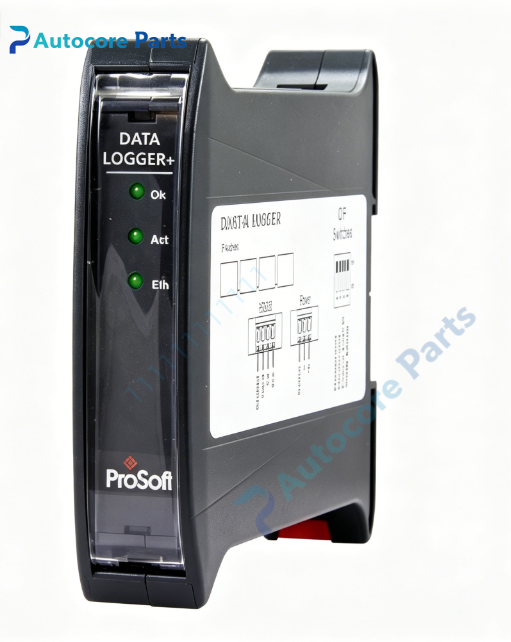
ProSoft PLX51-DLPlus-232 Enhanced Industrial Data Logger Plus
Technical Specifications
Model:PLX51-DLPlus-232
Brand:ProSoft
Product type:Enhanced Industrial Data Logger Plus Module
Power supply:10~28VDC,70mA@24VDC,max 1.7W
EtherNet/IP:110/100Mbps RJ45,max 10 CIP connections,max 20 TCP connections
Serial port:Isolated RS232,2.5kV galvanic isolation
Serial baud rate:1200,2400,4800,9600,19200,38400,57600,115200
Serial protocol:DF1 Full/Half Duplex,Modbus RTU
Error check:BCC,CRC
Data bit:8,stop bit:1,parity:None / Even / Odd
Storage:Non-volatile solid memory,support more than 16,777,216 data records
Time resolution:50ms timestamp
Weight:0.37kg
Operating temperature:-20℃ ~ +70℃
Storage temperature:-40℃ ~ +85℃
Relative humidity:5%~95%,non-condensing
Dimension:120mm22.5mm*101mm
Certification:CE,UL,Class I Division2
System compatibility
PLX51-DLPlus-232 belongs to ProSoft PLX51 series enhanced data logger module.
Read tag data from Rockwell EtherNet/IP Logix controllers,DF1 serial PLC and Modbus RTU field instruments.
Compatible with ControlLogix,CompactLogix,SLC500,PLC-5,MicroLogix.
Suitable for remote unattended stations,machinery OEM data collection,production traceability,fault historical recording and spare replacement.
Function
Collect and store process data with UTC timestamp,tag name,data type and value.
Two logging storage modes:stop recording when full or overwrite oldest records.
Supports up to 3 separate Logix controllers for tag reading.
Built-in web server,support real-time trend display for up to 5 variables.
Support REST API,output JSON format data for upper system automatic acquisition.
Export historical records to CSV file via web page or PLX50 Configuration Utility.
Work under Logix owned mode or standalone mode.
Support DF1 and Modbus RTU serial data source.
All configuration saved in non-volatile memory,retain setting after power off.
Installation
Mount module on DIN rail,connect 10~28VDC power supply and earth terminal.
Connect RJ45 to EtherNet/IP network,connect RS232 terminal to DF1 or Modbus RTU device.
Set serial baud rate,parity and data source via PLX50 Configuration Utility.
Select target PLC tags and configure data logging trigger conditions.
Check LED indicators after power-on.
Interface
110/100Mbps Ethernet RJ45,1isolated RS232 terminal,power & earth terminal,LED indicators:OK,ACT,ETH.
Feature
Thin DIN rail design,save cabinet installation space.
Large non-volatile memory for massive historical data recording.
Isolated RS232 serial port,reduce ground loop interference.
Built-in web trend function,view data curve directly without extra software.
REST API interface,simple integration with MES or SCADA platform.
Ideal for remote sites with limited communication bandwidth.
Built-in communication diagnostic function for troubleshooting.
Shock and vibration resistant design,stable long-term operation in industrial cabinet.
Diagnostic
Check OK and communication LED;communication failure:verify serial wiring,baud rate and parity;data abnormal:check PLC tag access permission and logging trigger setup.
Product Brief
PLX51-DLPlus-232 is ProSoft PLX51 series enhanced data logger plus module.
It collects and stores real-time process data from EtherNet/IP,DF1 or Modbus RTU devices,with web trend and REST API functions,widely used for remote equipment data recording,failure analysis and production traceability.
Disclaimer
Product parameters are for reference only and shall not be used as pricing basis. Goods are in short supply and will be powered on for inspection before shipment. Overseas delivery lead time is 3-7 working days. The product is only used for equipment maintenance and transformation.