English
 Русский язык
 بالعربية

Products Description
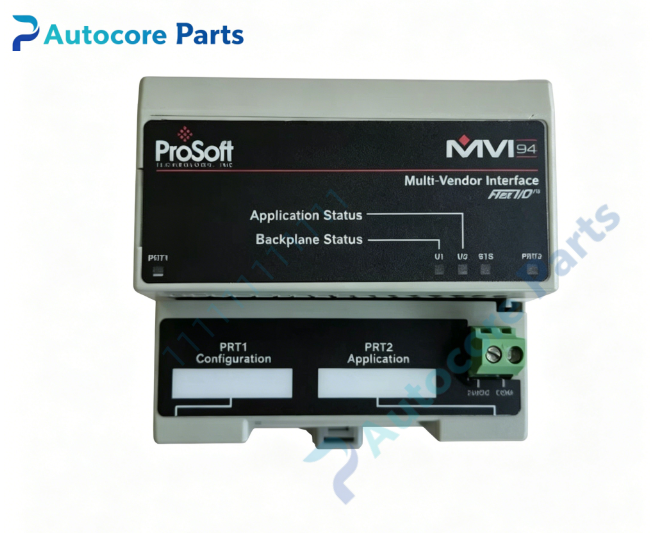
ProSoft MVI94-GSC Generic Serial Communication Module
Technical Specifications
Model:MVI94-GSC
Brand:ProSoft
Product type:Flex I/O Chassis Universal Serial Communication Module
Power supply:12~24VDC,max 3.25W
Backplane load:20mA@5V Flexbus
Serial ports:2MiniDIN8 port
PRT1:Configuration port,RS232
PRT2:Application port,jumper select RS232/RS422/RS485,500V optical isolation
Baud rate:110~115200bps
Data format:Data bit 7/8,stop bit 1/2,parity None / Even / Odd
Receive buffer:max 4096 characters,transmit per block max 10 characters
Supported protocol:ASCII,Modbus RTU,Modbus ASCII,custom serial protocol
Weight:0.36kg
Operating temperature:0℃ ~ +60℃
Storage temperature:-40℃ ~ +85℃
Relative humidity:5%~95%,non-condensing
Dimension:94mm94mm*69mm
Certification:CE,UL,Class I Division2
System compatibility
MVI94-GSC belongs to ProSoft MVI94 series Flex I/O serial communication module.
Installed in Allen-Bradley 1794 Flex I/O backplane.
Compatible with FlexLogix,ControlLogix,SLC500,PLC-5 via 1794 adapter(1794-AENT,1794-ASB,1794-ACN15).
Connect barcode scanner,weight scale,serial printer,serial instrument and other serial devices.
Suitable for packaging machinery,logistics weighing,old factory serial equipment transformation and spare replacement.
Function
Universal serial data transmission between Rockwell Flex I/O system and external serial devices.
Application port supports jumper switching RS232/RS422/RS485,isolated serial circuit.
Multiple message trigger mode:termination character,message timeout,inter-character timeout,fixed packet length,stream mode.
Support Modbus RTU/ASCII master/slave and custom ASCII communication.
Configuration port for module parameter setting,online status view and packet capture debugging.
Exchange data with PLC via Flex I/O backplane,read and write serial data block.
Built-in communication statistics and fault counter for troubleshooting.
Configuration via ProSoft configuration software.
Installation
Insert module into 1794 Flex I/O base and lock on DIN rail.
Connect 12~24VDC power supply and earth terminal.
Set port hardware jumper to select RS232 / RS422 / RS485 mode.
Connect serial field device to PRT2 MiniDIN8 port with matching cable.
Set baud rate,data format and message trigger rule in configuration software.
Download configuration to module,check LED status after power-on.
Interface
2*MiniDIN8 serial port,12~24VDC power terminal,Flex I/O backplane connector,LED indicators:APP,BACKPLANE,COMM,ERR.
Feature
Direct plug-in 1794 Flex I/O rack,no extra gateway hardware.
Isolated application serial port,reduce ground loop interference.
Flexible message framing mode,adapt barcode,scale,printer and many serial instruments.
Built-in serial data analyzer,easy to capture and debug serial message.
Compact Flex I/O single slot design,save cabinet space.
Shock and vibration resistant design,stable long-term operation in industrial cabinet.
Diagnostic
Check APP and COMM LED;communication failure:verify serial wiring,baud rate,parity and jumper setting;data abnormal:check message termination rule and backplane data block mapping.
Product Brief
MVI94-GSC is ProSoft Flex I/O universal serial communication module.
It is installed in Allen Bradley 1794 Flex I/O chassis to connect various serial instruments and equipment,supports ASCII and Modbus serial communication,widely used for serial peripheral integration of Rockwell automation system.
Disclaimer
Product parameters are for reference only and shall not be used as pricing basis. Goods are in short supply and will be powered on for inspection before shipment. Overseas delivery lead time is 3-7 working days. The product is only used for equipment maintenance and transformation.